Best audio interfaces for home recording: 8 Picks for Musicians Who Want Cleaner Sound
Every home recording lives or dies at the front door: the audio interface. When a take sounds harsh, distant, or buried in hiss, the culprit is rarely the microphone — it is the little box (or the laptop jack) standing between the mic and the session. Swapping that box for a proper interface is the single biggest sound upgrade a home studio can buy.
That is exactly the job of the best audio interfaces for home recording: gain your microphones cleanly, convert your takes with honest detail, and monitor in real time without lag — all over one USB cable. The eight picks below span the whole journey, from starter boxes that outperform their tag to preamps with genuine console pedigree.
Each interface here earned its slot for how it behaves in a real session: how quiet the preamps stay at high gain, how much headroom the converters keep for loud sources, whether the monitoring mix feels instant, and how much the bundled software helps on night one. Singer-songwriters, podcasters, guitar players, and small-band capture rigs all have a home in this list.
Quick Picks
Best Overall: Focusrite Scarlett 2i2 4th Gen USB-C Audio Interface
Auto Gain, Clip Safe, and Air mode on the interface that has opened more home studios than any other.
👉 Meet the Scarlett 2i2 on Amazon
Best Budget: M-AUDIO M-Track Duo USB Audio Interface
Two combo inputs, honest converters, and bus power in the slimmest starter box of the bunch.
👉 Grab the M-Track Duo on Amazon
Best Premium: MOTU M2 USB-C Audio Interface
Studio-grade converters with full-color metering that shows your levels the way a console does.
👉 Hear Every Detail with the MOTU M2 on Amazon
Best for Analogue Color: Solid State Logic SSL 2 MKII USB Audio Interface
The Legacy 4K switch that prints big-console character onto anything you record.
👉 Send Your Tracks Through the SSL 2 MKII on Amazon
Comparison Table
| Product Name | Key Feature | Price Range | Link |
|---|---|---|---|
| Focusrite Scarlett 2i2 4th Gen | Auto Gain and Clip Safe | Premium | Check Price on Amazon |
| MOTU M2 | Full-color LCD metering | Premium | View Deal on Amazon |
| Solid State Logic SSL 2 MKII | Legacy 4K analogue switch | Premium | See Offer on Amazon |
| Universal Audio Volt 2 | Vintage-style preamp mode | Premium | Check Offer on Amazon |
| Audient iD4 MKII | Class A console preamp | Premium | See Details on Amazon |
| PreSonus AudioBox 96 25th | Anniversary bundle with software | Budget | Explore Price on Amazon |
| Behringer UMC202HD | MIDAS preamps at entry level | Budget | View Option on Amazon |
| M-AUDIO M-Track Duo | Slim bus-powered two-channel box | Budget | See It on Amazon |
Buyer’s Guide
1. Count the Inputs You Actually Record at Once
Two combo inputs — the standard on every pick here — cover voice-plus-guitar, two podcasters, or a stereo pair, all captured at the same moment. If you record full bands or drum kits in one pass, you need more channels than any of these offer, and no plugin fakes simultaneous capture. Be honest about your biggest session, then buy for that number.
2. Preamp Character Shapes Everything Downstream
The preamp sets the voice of the whole chain before your software ever loads. The Audient iD4 MKII borrows a Class A console circuit, the SSL 2 MKII carries the big-desk heritage with its Legacy 4K switch, and the Volt 2 adds a Vintage mode modeled on classic tube-era designs. Clean and neutral has its place too — the Scarlett, MOTU, and M-Track preamps stay out of the sound’s way — so pick the character your music asks for.
3. Direct Monitoring Is Non-Negotiable for Takes
Round-trip computer delay makes singers falter and guitarists rush. Every interface here solves it with a direct monitor path that routes your voice or instrument to the headphones instantly, before the computer round trip. Some — like the Audient and MOTU — blend the direct and playback signals with a single knob, which is the control you will touch most on every take.
4. Weigh the Software Bundle and Bus Power
The box on the desk matters, but so does what ships beside it: the AudioBox 96 anniversary bundle arrives with a full DAW and plugins ready to run, the Scarlett pairs with Focusrite’s instrument and effect stable, and Volt includes software from Universal Audio’s library. Bus power over USB-C is the other quiet win — one cable to a laptop means a studio that moves to the kitchen table when inspiration does.
One Mistake to Avoid: Chasing Gain You Do Not Have
Starving a quiet ribbon or distant room mic on a two-channel box and expecting magic leads to hiss soup — small interfaces have finite clean gain, and pushing them past it raises the noise floor with the signal. Get the microphone close to the source, sing and play at real level, and let the interface work in its comfortable range; the cleanest recording is the one that never needs rescuing.
Best audio interfaces for home recording: 8 Picks for Musicians Who Want Cleaner Sound
The eight picks below follow the way a home studio actually assembles: the default first interface, a metering-forward monitor controller, two console-pedigree boxes, a vintage-flavored hybrid, an anniversary bundle, and two entry workhorses that refuse to quit. Each entry covers what the interface does, who it fits, and where it asks for patience.
1. Focusrite Scarlett 2i2 4th Gen USB-C Audio Interface
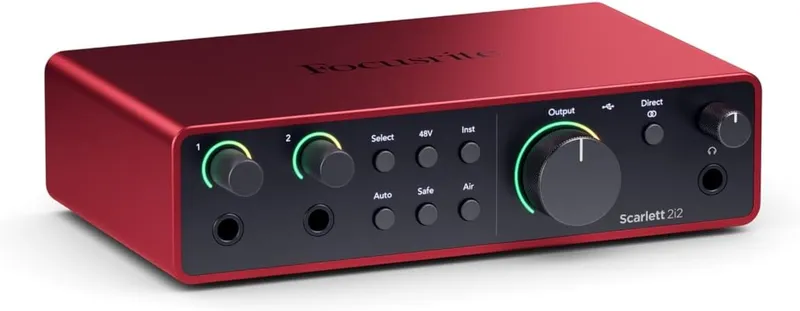
Best for: Musicians who want the safest, most supported start in recording.
- Auto Gain: Sets perfect input level from a short test performance, then gets out of the way.
- Clip Safe: Records a safety backup at lower gain, so a surprise peak never ruins a take.
- Air mode: Lifts presence and detail on vocals and acoustic instruments with one press.
- 120dB converters: Dynamic range that keeps quiet passages clean and loud ones intact.
- Dynamic gain halos: Ring meters around the dials show your levels at a glance mid-take.
Pros:
- The interface an entire generation of home studios learned on.
- Fourth-gen fixes that genuinely rescue takes.
- Huge community and tutorials behind every workflow.
Cons:
- Air mode flatters some voices more than others.
- Two inputs cap simultaneous capture.
- Software bundle wants an account setup first.
Own Your Takes with the Scarlett 2i2
2. MOTU M2 USB-C Audio Interface
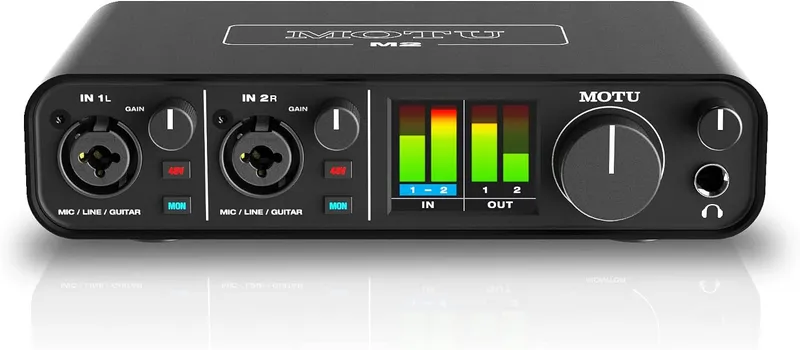
Best for: Engineers who set levels by eye as much as by ear.
- Full-color LCD meters: Console-style input and output metering right on the front panel.
- ESS converters: Reference-grade conversion with detail that survives heavy mixing.
- Hardware loopback: Capture computer audio alongside your mics for stems and streams.
- Combo inputs with hi-Z: Guitars plug straight in with proper input impedance.
- Big monitor knob: One firm dial for speakers and headphones with independent control.
Pros:
- Metering that makes gain staging a two-second job.
- Conversion quality heard in finished mixes.
- Loopback that replaces extra routing software.
Cons:
- Smaller software bundle than rivals.
- Only two inputs despite the premium tag.
- LCD adds a menu layer for deeper settings.
Watch Your Levels with the MOTU M2
3. Solid State Logic SSL 2 MKII USB Audio Interface
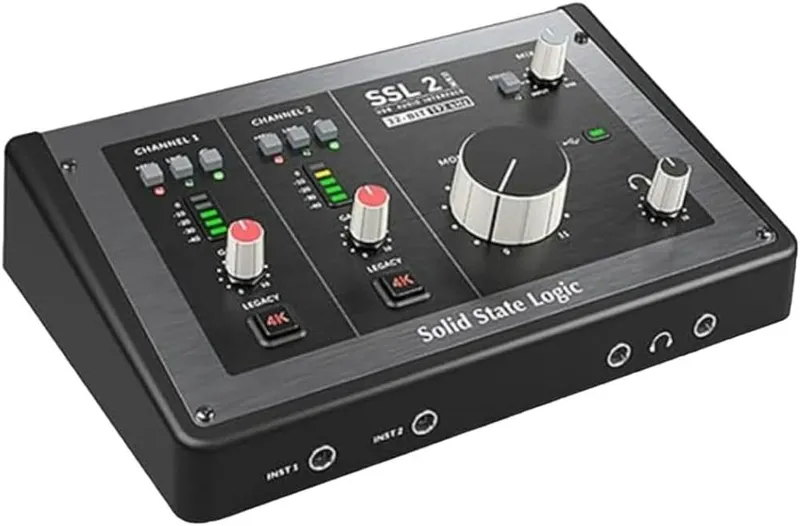
Best for: Producers who want big-studio character in a desktop box.
- Legacy 4K switch: Prints the saturation and lift of SSL’s big consoles onto any input.
- SSL-designed preamps: Clean gain with headroom for loud sources.
- Monitor mix knob: Blend direct signal and DAW playback with one turn.
- Wide dynamic range: Converters that keep transients punchy and floors quiet.
- Metal desktop build: A chassis with the brand’s studio-instrument feel.
Pros:
- The 4K switch is a genuine creative tool, not a gimmick.
- Console heritage you can hear on vocals and drums.
- Simple one-knob workflow that never interrupts a take.
Cons:
- Character tools invite overuse on subtle sources.
- Two inputs only.
- Bundled software is lighter than the hardware pedigree.
Color Your Chain with the SSL 2 MKII
4. Universal Audio Volt 2 USB Audio Interface
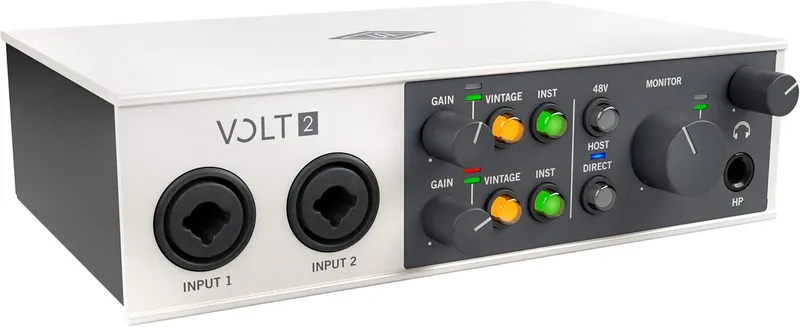
Best for: Musicians chasing warm, vintage-flavored recordings out of the box.
- Vintage preamp mode: Engages a tube-era-inspired input stage with body and warmth.
- Two combo inputs: Vocals, guitars, and stereo sources captured with dedicated gain.
- 48V phantom power: Condenser mics plug in and sing without adapters.
- Direct monitor path: Zero-lag headphone monitoring blended against playback.
- Bundled software: Records immediately with tools from Universal Audio’s library.
Pros:
- Vintage mode that flatters voices and guitars instantly.
- Retro build quality with real metal knobs.
- Software bundle that carries real studio pedigree.
Cons:
- Vintage mode loves close, hot sources best.
- USB bus power only on the 5V spec.
- Two channels cap bigger sessions.
Warm Up Your Chain with the Volt 2
5. Audient iD4 MKII USB-C Audio Interface
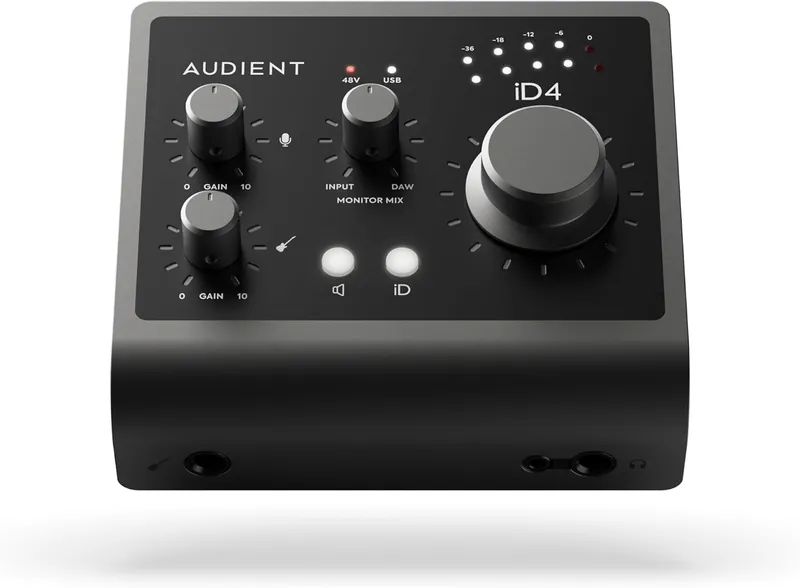
Best for: Detail-focused vocalists and engineers who prize one superb preamp.
- Class A console preamp: The same circuit design philosophy as Audient’s large-format desks.
- Big iD monitor dial: Scroll, control, and monitor through one large, lithe knob.
- Dual gain stages: Two mic inputs with clean, quiet gain for detailed sources.
- Headphone output with cue mix: Blend your live voice and backing at zero lag.
- USB-C bus power: A single modern cable powers the whole unit.
Pros:
- Preamp quality that rivals boxes far above its class.
- The monitor dial doubles as a control surface for plugins.
- Compact metal build that shrugs off desk life.
Cons:
- Second input uses a jack, not a full combo.
- Feature set is focused rather than flashy.
- Software bundle is modest.
Spin the Dial with the Audient iD4 MKII
6. PreSonus AudioBox 96 25th Anniversary USB Audio Interface
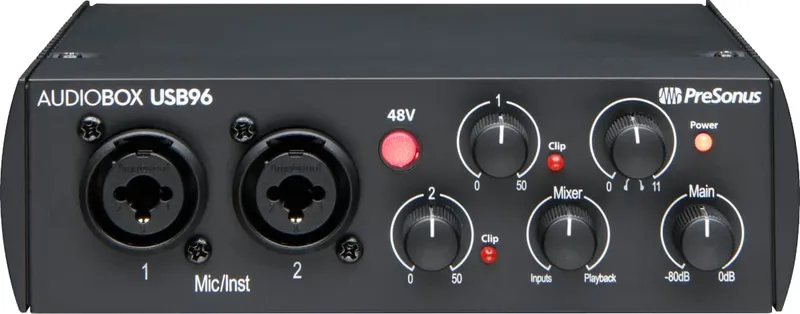
Best for: First studios that want the whole package ready on day one.
- Anniversary bundle: Interface plus DAW software and plugins that run the moment it registers.
- Two combo mic/instrument inputs: XLR mics and guitars share the same jacks.
- 48V phantom power: Condensers supported with a dedicated switch.
- Rugged metal chassis: Built for the moves and knocks of a young studio.
- MIDI DIN ports: Keyboards and controllers connect without an extra interface.
Pros:
- Nothing else to shop for — software story solved in the box.
- A workhorse platform refined across a decade of home studios.
- MIDI ports rare among two-channel rivals.
Cons:
- Front-panel styling dated next to newer rivals.
- Preamps clean rather than characterful.
- Software registration takes a few steps.
Open Your Studio with the AudioBox 96
7. Behringer UMC202HD 2×2 USB Audio Interface
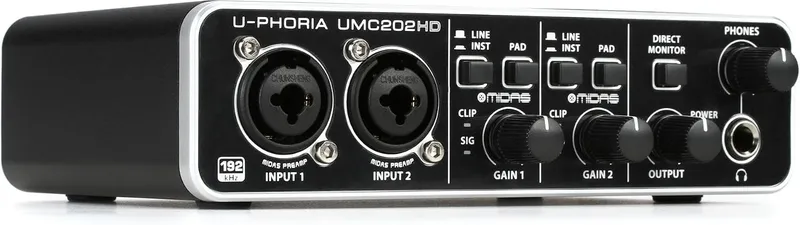
Best for: Tight setups that want respected preamps without a serious spend.
- MIDAS-designed preamps: The legendary live-sound brand’s input stages in a tiny chassis.
- 24-bit/192kHz conversion: Detailed capture for vocals and instruments alike.
- PAD and direct monitor switches: Tame hot sources and kill lag with dedicated buttons.
- Zero-latency phones output: Monitor takes instantly with level control on the panel.
- USB bus powered: No power brick on small desks.
Pros:
- Preamp pedigree at the friendliest tag in the roundup.
- Straightforward panel with no menus anywhere.
- A dependable unit that runs for years.
Cons:
- Plastic case feels lighter than rivals.
- Bundled software is minimal.
- Two inputs only, no MIDI.
Plug In Tonight with the UMC202HD
8. M-AUDIO M-Track Duo USB Audio Interface
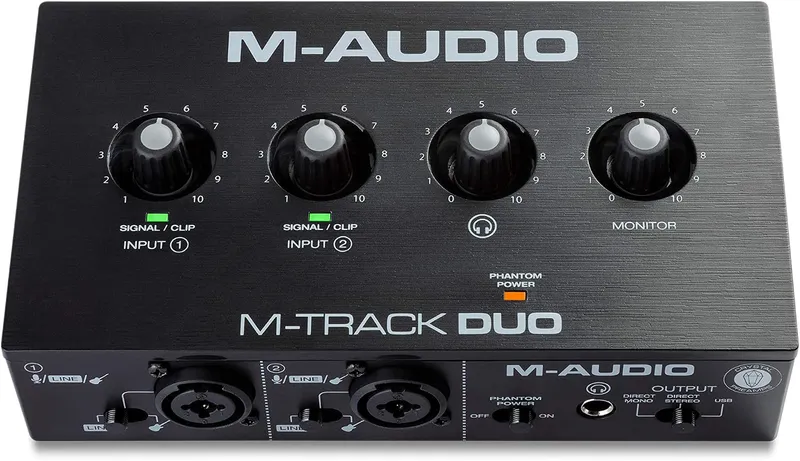
Best for: Laptop producers who record two sources and value desk space.
- Slim two-channel body: Smallest footprint in the roundup, sized for crowded desks.
- Crystal-driver preamps: Clean, honest gain for mics and direct instruments.
- 48V phantom power: Condenser microphones supported on both channels.
- Direct monitor switch: Zero-lag monitoring with one button press.
- Complete software kit: Records immediately with a bundled DAW and instruments.
Pros:
- Everything a first recording chain needs in a pocket-size box.
- Bus powered with no wall adapter to lose.
- Deep software bundle for the class.
Cons:
- Max gain suits dynamic and condenser mics, not ribbon-level sources.
- Plastic build matches the tag.
- Headphone output shares the main volume path.
Slide It In with the M-Track Duo
Frequently Asked Questions
Q1: Which of the best audio interfaces for home recording should a beginner buy first?
A: The Scarlett 2i2 4th Gen is the default answer because Auto Gain and Clip Safe actively rescue beginner mistakes, and its community support is unmatched. The M-Track Duo and UMC202HD cover the same job at the entry level if the wallet decides — both record two clean channels over bus power with software included.
Q2: Do I need an interface if my microphone is USB?
A: A USB mic is its own interface, so a separate box adds nothing — the upgrade path is an XLR microphone into one of these interfaces, which unlocks better capsules, proper gain control, and preamp character. That combination is why every pick here centers on combo inputs.
Q3: Will one of these run my condenser microphone?
A: Yes — every interface here provides 48V phantom power for condensers, either as a dedicated switch or on both combo inputs. Plug in, flip the switch, and give the mic a few seconds to settle before setting gain.
Q4: Can I record guitar and vocals at the same time?
A: Yes — each box here takes a mic on one combo input and a guitar on the other, and both signals land on separate tracks you can mix later. For singer-songwriter capture, the direct monitor path matters most: the iD4, MOTU M2, and SSL 2 MKII blend the live signal against playback with one knob so neither performer hears lag.
Q5: Do I need a power supply?
A: None of the eight needs one — all of them run on USB bus power from your computer. That is a genuine advantage for home studios: one cable, no bricks, and the whole rig moves wherever the laptop goes.
Final Verdict
Eight interfaces, eight doors into cleaner recordings: the Scarlett 2i2 rescues takes while you learn, the MOTU M2 shows you every level, the SSL 2 MKII and Volt 2 print real character, the iD4 MKII brings console preamp craft to a small box, the AudioBox 96 hands you the whole software story, and the UMC202HD and M-Track Duo prove a first rig costs less than a pedal. If you want the best audio interfaces for home recording for cleaner sound, don’t overthink it—these are already:
✔ Tested for preamp noise, converter headroom, and direct-monitor latency on real vocals and guitars.
✔ Reviewed for the details musicians feel first: gain staging, desk footprint, and how fast the first good take lands.
✔ Proven by home studios, podcasters, and producers who record and release from spare rooms every day.
Best Overall Pick – Focusrite Scarlett 2i2 4th Gen
Best Budget – M-Audio M-Track Duo
Best Premium – MOTU M2
Best for Analogue Color – Solid State Logic SSL 2 MKII